You can create your own emoji on Snapchat using Bitmoji. Bitmoji is officially supported by Snapchat and can be connected on your iPhone without the need to sign up or download it separately. Create a personalized face emoji for free using Bitmoji on Snapchat. You can customize your style by adding features such as glasses, hairstyles, beards, facial expressions, and more.
Once you set your profile emoji, you can edit it, reset it oe delete it anytime. I’ll show you how to edit or remove it and set your original picture from your iOS device’s camera roll.
Remove or Reset Snapchat Bitmoji on your iPhone, iPad
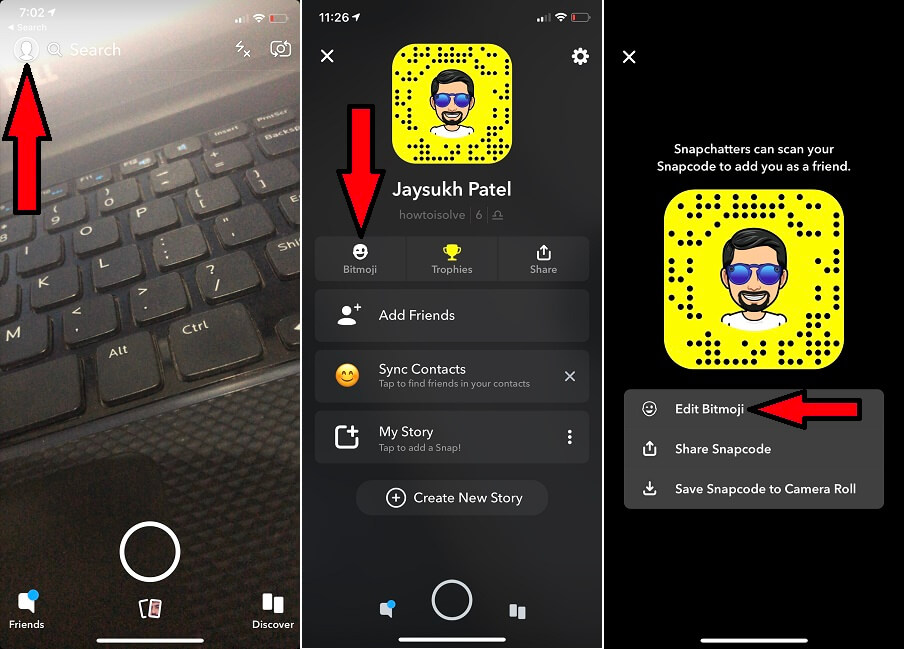
- Tap on the Profile icon at the top-left corner of the screen.
- Next, Tap on Bitmoji near to trophies option.
- Here’s the option for “Edit Bitmoji”. Next, the app will ask about what types of changes you want to make.
- Change My Outfit or Edit my Bitmoji.
4: Go with Edit my Bitmoji, Now you can start any types of changes and save or publish right now.
To Remove or unlink Bitmoji from a Snapchat account
1: At the end of the screen, you will find “Unlink my Bitmoji.” Tap on it.
2: Verify and go with unlink, This will “Are you sure you want to unlink your Bitmoji account? If you created a Bitmoji through Snapchat, it will be deleted”.

That’s it.
The process of Edit your Emoji profile on Snapchat is quite easy and straightforward. Still, you have any confusion regarding Reset/Edit or Remove Snapchat Bitmoji on iPhone or iPad, Share with us on the comment box. Also, Follow to get more updates and tips on new features.