Whether you’ve found your better half or ideal match or don’t have time to respond to swipes, permanently deleting the Bumble account is the correct choice. Many users have already reported that despite following correct procedures and giving genuine reasons, their Bumble account is still active and some of them are being charged for subscriptions. Apps like these won’t let you leave easily, however, if you reply to every single answer while deactivating the Bumble account, you should not face such circumstances.
We’ve prepared this stepwise guide to permanently delete the Bumble Profile in sequence, how to cancel subscriptions, revoke third-party app access, and more. Continue to read.
How to Delete Bumble Profile From Mobile App or Desktop Browser
Deleting the Bumble Account is separated into different steps, just to make sure you understand properly. Here’s how to do it.
Skip this step 1, if your Bumble account isn’t connected or Signed in with Your Social account like Facebook.
Step 1: Unlink Bumble Account from Facebook
Ignore this step, if you haven’t linked Facebook with Bumble.
Using Facebook App:
- Visit the Facebook App.
- Go to the Settings. Select Settings & Privacy and Settings.


Using Facebook Website:
- Open Facebook on any web browser.
- Click on the down button on the top far right side, move the cursor, it will show Account.
- Click Settings & privacy > Settings.
- Scroll down and look for Apps & websites on the side panel.
- Select Bumble and Remove
Step 2: Delete Bumble Profile From Mobile App
After removing Facebook Access, now is the time to delete the Bumble Account.
- Go to the Bumble App. Log in to your Bumble profile.
- Visit your Bumble profile and tap Settings.
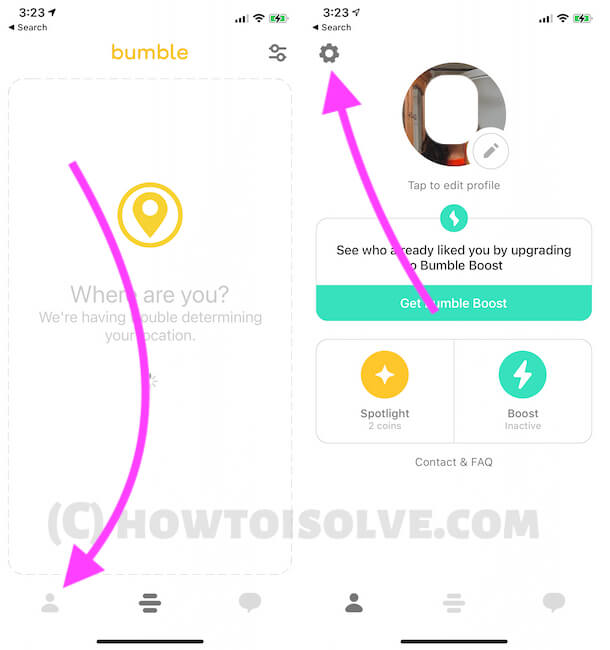

With this, all of your Bumble data such as Messages, Connections, Chats, Notifications, etc will be removed, and you can’t access any of these.
Step 3: Cancel Bumble Subscription
Skip this step if you haven’t subscribed to Bumble Boost or any other premium services. And don’t forget to cancel the subscription if you have Bumble Boost otherwise, they will keep charging you even after deleting the Bumble Account.
In Android:
- Visit Google Play.
- Tap on the hamburger menu.
- Select Subscriptions.
- From here Cancel the Bumble subscription.
For iOS/iPadOS:
- Go to the Settings App on the iPhone. Tap on your name.
- Select Subscriptions.
- Select Bumble and tap Cancel Subscription.
Can’t Delete Bumble Account or Bumble Still Charging for Subscriptions?
This is the worst case that happens with Bumble users, however, you can contact the Bumble Support Team and ask them to cancel the subscription and delete the account.