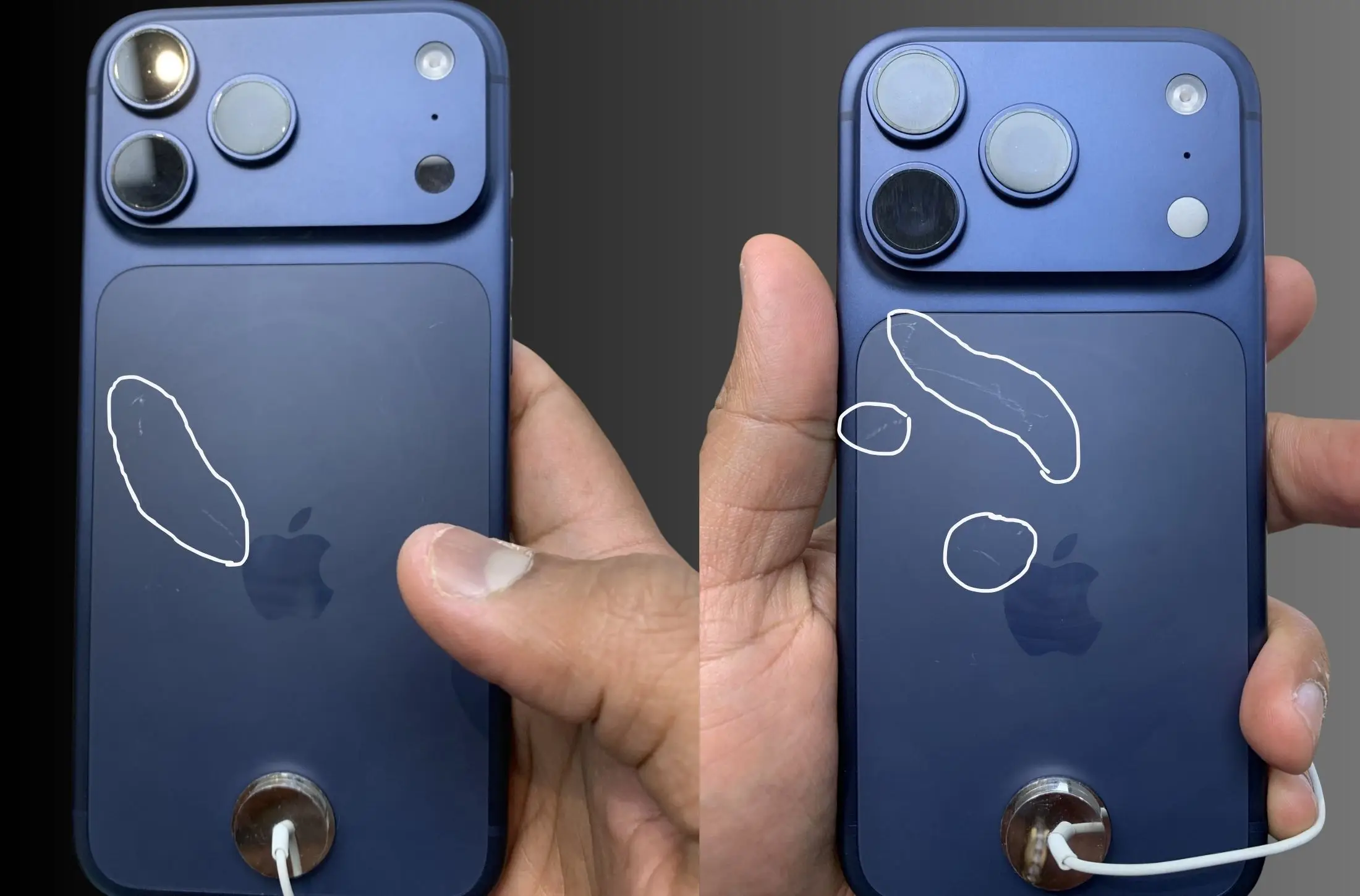
A wave of frustration hit U.S. Apple shoppers on Friday as the newly released iPhone 17 Pro (Deep Blue) and iPhone Air (Space Black) models began showing scuffs and scratches just hours after being unboxed. With the global iPhone 17 launch underway, complaints about the durability of these premium color finishes are multiplying—especially from users who expected the flagship phones to handle everyday use without visible blemishes.
At one local Apple Store, customers even noticed scratches on the ceramic back panel of display units, right where the MagSafe stands connect. This has sparked debate about whether the iPhone 17 Pro and iPhone Air finishes are truly built to last or if protective cases are now a must from day one.
U.S. Shoppers Raise Concern After Deep Blue & Black Models Launch Worldwide
Many U.S. buyers noticed that Deep Blue and Space Black finishes show scratches more clearly than lighter models. If you’re still deciding, our guide on Which iPhone 17, 17 Pro & Pro Max Color Should You Buy? can help you choose a finish that hides scratches better.
What’s Going Wrong — What Users Are Saying
- Deep Blue Pro models show wear quickly. Display units in Apple Stores across New York, San Francisco, and other major cities are already marred with visible scratches on the back panel and along the aluminum sides. The Deep Blue finish, while striking, seems to highlight every little scratch.
- Black iPhone Air suffers a similar fate. The ultra-slim Air model in Space Black is also being picked apart by early users, with reports pointing toward scratches around the MagSafe ring and rear aluminum shell.
- Aluminum instead of titanium. One of the major changes this year is Apple’s shift from titanium frames (previous Pro generations) to anodized aluminum. While lighter and offering better heat dissipation, aluminum is softer and more prone to visible abrasions—especially on darker, high-contrast finishes
Why the Damage Looks Worse on Certain Colors
- Color contrast. Deep Blue and Space Black have dark coatings that make scratches stand out sharply. Any abrasion reveals silver-colored aluminum underneath, which makes every tiny mark much more noticeable.
- Anodized finish limits. Unlike more durable materials (like titanium or stainless steel), the anodized layer on aluminum can protect color, but once disturbed, it easily shows wear. These coatings are susceptible especially around edges, corners, and areas of contact like the MagSafe ring.
What Apple Is Saying & What Experts Believe
- Apple has not yet officially addressed widespread recall or apology regarding scratch issues, but analysts believe the damage is largely cosmetic.
- Some Wall Street analysts think the issue won’t significantly hurt sales. They argue that many users protect their phones with cases, and that scratch visibility becomes less of a concern when handled daily.
How to Prevent & Fix Scratches
Here are some practical tips—especially for those who just stepped out with a brand-new Deep Blue Pro or Space Black Air:
- Use a protective case from day one. Even a thin bumper or clear case helps hide edges and protects vulnerable areas like the MagSafe portion.
- Avoid setting the phone down on rough surfaces. Countertops, tabletops, or bags with keys will scratch glare-prone finishes easily.
- Use screen protectors and rear film. Protective films exist for backs too—especially helpful for the rear panel or camera plateau.
- Clean gently. If dust or grit gets under fittings or rings, it can cause micro-scratches—regularly wipe with microfiber cloths.
- Choose lighter colors. If you care about scratch visibility, silver or lighter options tend to hide small marks better than dark anodized shades.
What You Should Do If You Already Have Scratches
- Go back to the Apple Store and compare with your demo unit (if it looks worse than average, you might have a case for replacement or repair).
- Use Apple’s support—if paint or finish comes off severely after minimal handling, there might be coverage under warranty or AppleCare+, depending on your region.
- Document with photos right away (especially under good lighting) so you have evidence for support claims.
Verdict: Is This a Dealbreaker?
For many users—gamers, professionals, students—the scratch issue is annoying, not catastrophic. The iPhone 17 line still delivers strong performance, camera improvements, battery life, and new features. But the trade-off in physical durability for some color options is real.
If you’re buying:
- Go ahead if you want one now, but plan to get a good case and maybe choose a lighter color.
- If finish and appearance matter a lot, you might want to wait until Apple releases a color or finish variant with better scratch resistance—or until cases with protection for vulnerable areas are more commonly available.
Final Thoughts
Apple’s newest flagships are beautifully designed and technically impressive—but the Deep Blue Pro and Space Black Air models appear more vulnerable to scratches than many buyers expected. For users in the U.S.—where phones often see harsh conditions, daily drops, and frequent handling—the case requirement isn’t optional; it’s essential. Scratches on day one don’t mean poor design, but they do remind us of the trade-offs between aesthetics and material durability.