If the ESPN fantasy app is crashing, freezing, or simply not loading today, you’re not alone — especially during busy game days when millions of fans are managing their fantasy lineups. Whether you’re seeing blank screens, login issues, or “network error” pop-ups, these problems can be frustrating and time-sensitive.
The good news? Most ESPN Fantasy app issues can be fixed in just a few minutes. Here’s a comprehensive guide to help your app run smoothly again, so you don’t miss a crucial lineup change.
Possible solutions to fix the ESPN fantasy football not working
| Problem | Quick Solution | Hint |
|---|---|---|
| App won’t load / stuck on splash screen | Force close and relaunch the app | Clears temporary glitches quickly |
| App keeps crashing | Clear app cache/data or reinstall | Corrupted files often cause repeated crashes |
| Login issues | Log out and log back in | Refreshes account authentication |
| Slow loading or freezing | Switch between Wi-Fi and mobile data | App won’t load/stuck on splash screen |
| Blank pages / missing content | Update the app via App Store / Play Store | Updates fix bugs and improve compatibility |
| Not opening after tapping | Restart your phone | Resets background processes |
| Still not working | Contact ESPN Support with device details | Likely account- or server-related |
| Suddenly stopped working for everyone | A weak network is a common cause | Wait for ESPN to resolve an outage |
1. Check ESPN Server Status Today

- Visit downdetector.com or ESPN’s official social channels to confirm if it’s a widespread outage.
- If servers are down, the issue is on ESPN’s end — wait until they resolve it.
Hint: Outages often occur right before major games or on Sunday mornings when traffic peaks.
2. Verify Your Internet Connection
- Switch between Wi-Fi and cellular data to see if the issue persists.
- Reset your router or toggle Airplane Mode on and off to refresh your connection.
Hint: Weak or unstable internet is one of the most common reasons the app won’t load.
3. Force Close & Restart the App
- On iPhone: Swipe up from the bottom, find ESPN Fantasy, swipe it away, and reopen it.
- On Android: Open Recent Apps, close ESPN Fantasy, then restart it.
Hint: This clears temporary glitches without deleting data.
4. Clear App Cache and Data
- On iPhone: Go to Settings → General → iPhone Storage → ESPN Fantasy → Offload App, then reinstall.
- On Android: Go to Settings → Apps → ESPN Fantasy → Storage → Clear Cache (and Clear Data if needed).
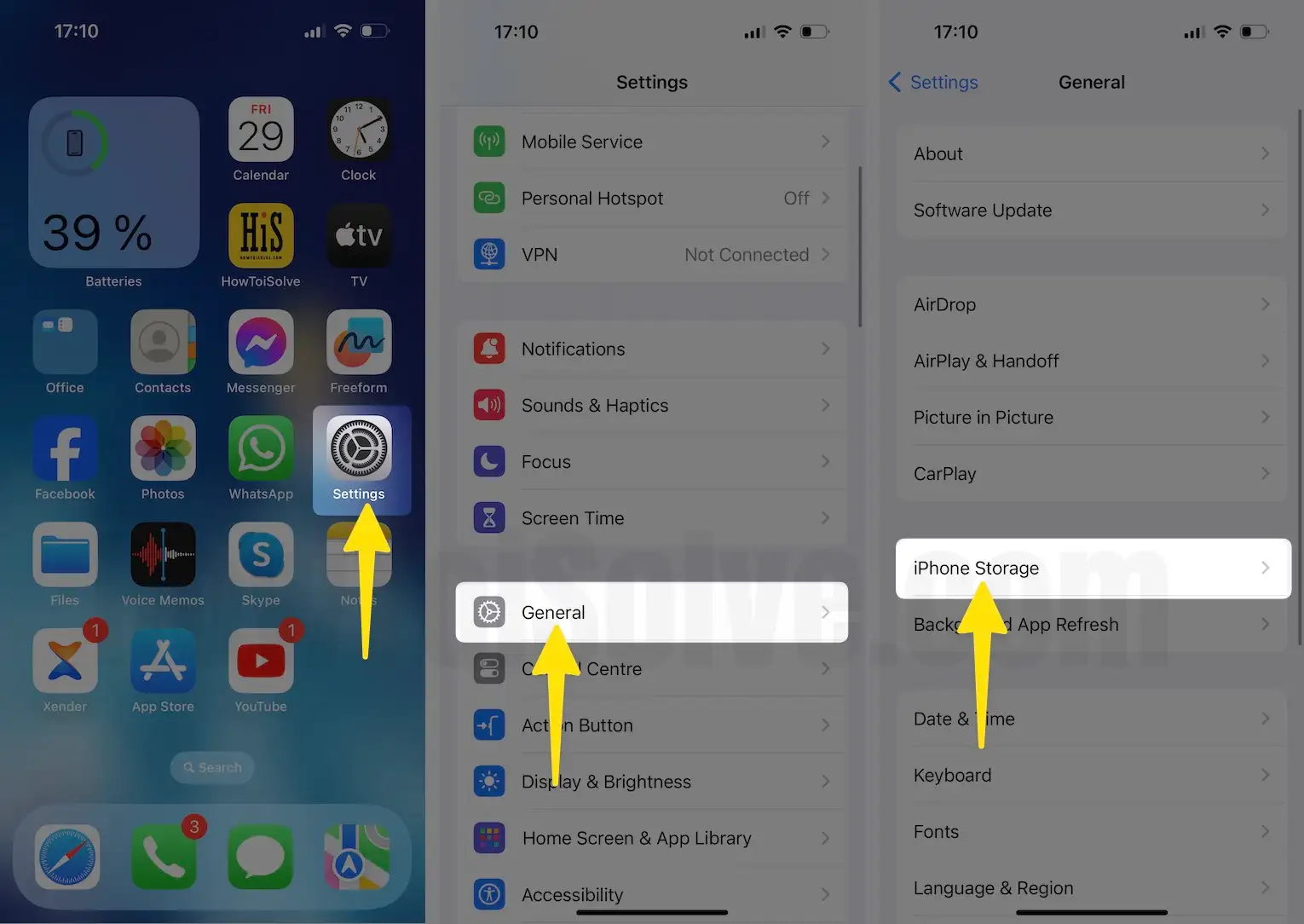
Hint: Cached data can corrupt and cause crashes — clearing it often resolves persistent problems.
5. Update the App
- Visit the App Store or Google Play Store and install any pending updates for ESPN Fantasy.
- Updates often fix bugs, crashes, and compatibility issues with the latest OS versions.
6. Update Your Device’s Software
- On iPhone: Go to Settings → General → Software Update and install the latest iOS version.
- On Android: Go to Settings → System → Software Update to check for updates.
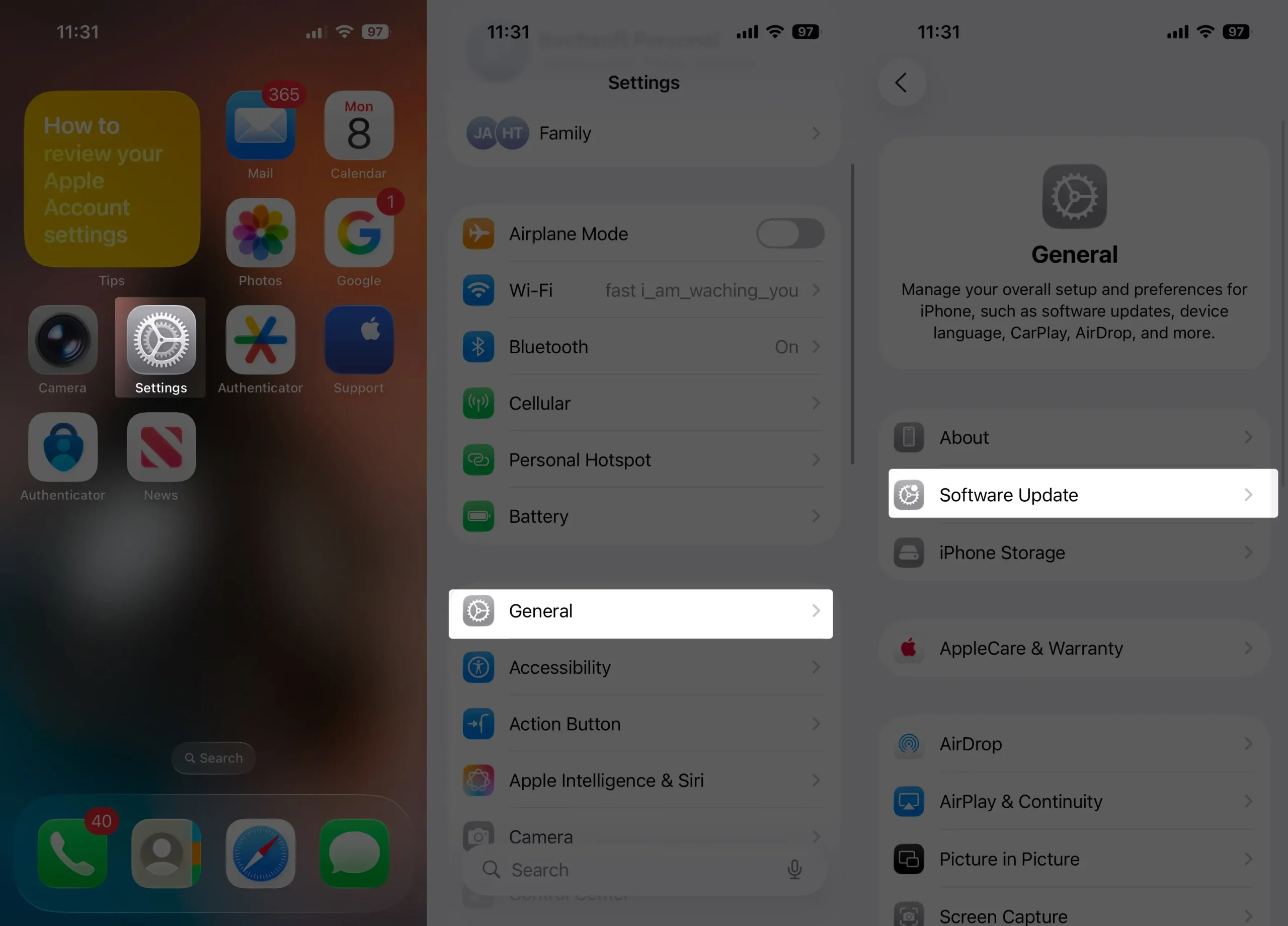
Hint: Running outdated OS versions can cause app instability.
7. Log Out & Log Back In
- Open the app, log out of your ESPN account, and sign back in.
- This refreshes authentication and can fix login loops or account syncing issues.
8. Reinstall the App
- Delete ESPN Fantasy from your device and reinstall it from the App Store/Play Store.
- This ensures you have a clean install free of corrupted files.
9. Disable VPN or Ad-Blockers
- VPNs and aggressive ad-blockers can interfere with the app’s network calls.
- Temporarily disable VPN and try again.

10. Contact ESPN Support
- If none of the above works, visit ESPN’s Help Center or use their in-app support chat.
- Provide device details, OS version, and screenshots of the issue for faster assistance.
Bottom Line
The ESPN Fantasy app can occasionally act up, but most issues are easily fixed by restarting the app, clearing cache, or updating your device and app version. Always check ESPN’s server status first — if it’s an outage, no amount of troubleshooting will help until ESPN resolves it.
Following these steps ensures you get back to managing your fantasy lineup without missing a game-winning move.