An Apple watch is a useful customization and pretty personal, its Accessories. The Apple Watch has an attractive and unique function compared to traditional Apple Watch alternatives. The purpose is that we have already titled to change the Apple Watch band without tools. But, how to do? For that, you need to know some necessary awareness that you can get in this thread, or you have the option to read the paper document instructions that come in the box of a brand-new Apple Watch. I hope this guide also help those guys who are having the trouble of Apple Watch band won’t come off or stuck.
As per your thinking, you can buy the new bands and then change them whenever you want. I hope you will like Apple’s modern concept, which will make your events, occasions, and lifestyles very different than ever before.
For that, many third-party Apple Watch bands are available in the Market and Online Store, likely the most prominent of which is Amazon. Furthermore, an Apple watch comes with the Classic buckle, leather loop, Link bracelet, Milanese Loop, Modern buckle, and Sports band. We don’t know which Apple Watch you have purchased, but we can apply the guide to all Apple Watches.
Way to Replace or Change Apple Watch Band
Finally, you have a band and decide to change Apple watch band. First of all, you need to put your Watch face down over a clean surface area that you can easily find around you, for instance, a microfiber cloth/ soft, lint-free, or padded mat. Then go next until you wrap up this process successfully.
1. let’s remove your iWatch bands, Press the band release button appears down the side of the Apple Watch which illustrated in the below picture.
2. Now, side the Band across to remove it
3. After that, take your another Band on hand and slide the new band in belt slot.
That’s it.
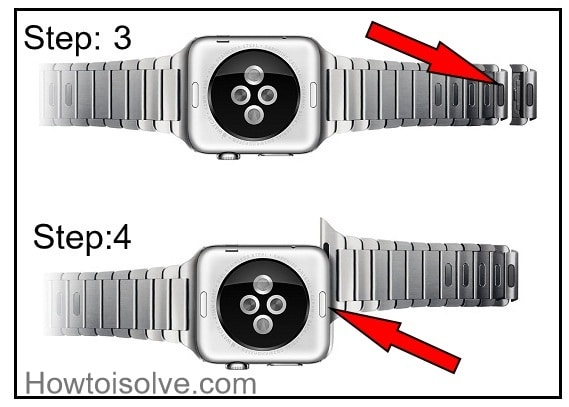
Steps to Remove Link bracelet from Apple Watch – Follow and avoid damaging band or Clasp
→Close the butterfly closure.
→Next, you need to hold down a quick release button.

→ Gently pull the Links apart.
→Now, finally press the band release button to remove your band.
A Caveat: Never try force a band into the slot. If your Apple watch band doesn’t slide out, at that time you’ve to press the band release button again. If you can’t feeling or hearing a click, then try to push the band to the left and then to the right. Furthermore, after the band is installed appropriately.
The band won’t freely slide or move left to right and vice versa until you hold down the band release button. If you are having an issue with the band not locking, center the band and push it into place. Next, you need to wiggle the band up and down carefully. Apple Says don’t wear an Apple Watch if the band is sliding.
We’re happy to share the topic of changing the Apple Watch band for all Apple Watch Series 3, AW Series 2, and Apple Watch 1. Stay tuned with us for daily updates on tactics and gimmicks for Apple Watch and Apple Watch Accessories.
There is a reason to ask a question, can I change Apple Watch Sports bands? And, an answer is yes, you guys, you can turn the Sports band to any other Apple and non-Apple bands like leather, Milanese loop band.
Even you can also interchange between Series 2 to Series 1. The Just condition is Watch face (38MM and 42MM) fits the same size Watch Case.
If you persist trouble related to won’t change Apple Watchband stuck or the band not locking. Then, we recommend you, make an appointment with the Genius Bar at your nearest Apple store to further assistance.