Mountain View, California-based Whatsapp is a personal real-time messaging app for iOS, Android, and desktop base. It has many features like Starred messages for the bookmark, Calls, Group messages, personal chat, and yeah all conversions stay with the end-to-end encryption. Earlier, we discussed how to create broadcast lists in WhatsApp on iPhone. Because the broadcast list is one-to-many communication. Once you have created the broadcast lists, even though you want to edit or delete a contact from broadcast lists then you can do it. In this thread, we will talk about deleting a contact from the Whatsapp broadcast list iPhone.
The Whatsapp broadcast list makes it very easy to send a single message to more than one user from all Whatsapp contacts. You can create a new broadcast list very simple way. Like as you can edit or delete, too. So let’s read the below instructions carefully to edit or delete a contact from the Whatsapp broadcast list with essential pictures.
The ultimate guide to Delete a Contact from WhatsApp Broadcast List iPhone
Step 1. Launch Whatsapp from your iPhone home screen. Tap on the Chat icon right-bottom on the screen. Now see at the top-left side of the screen and hit on Broadcast lists.

Step 2. Tap on (i) next to the broadcast lists to Edit or delete a contact or full broadcast list. Remove Contact from the list by Swipe to the Left and tapping on the Delete option.
Step 3: That’s it. Next is How to Edit the Broadcast list for Add New Contacts.

Steps for Add New Contacts on WhatsApp Broadcast List on iPhone
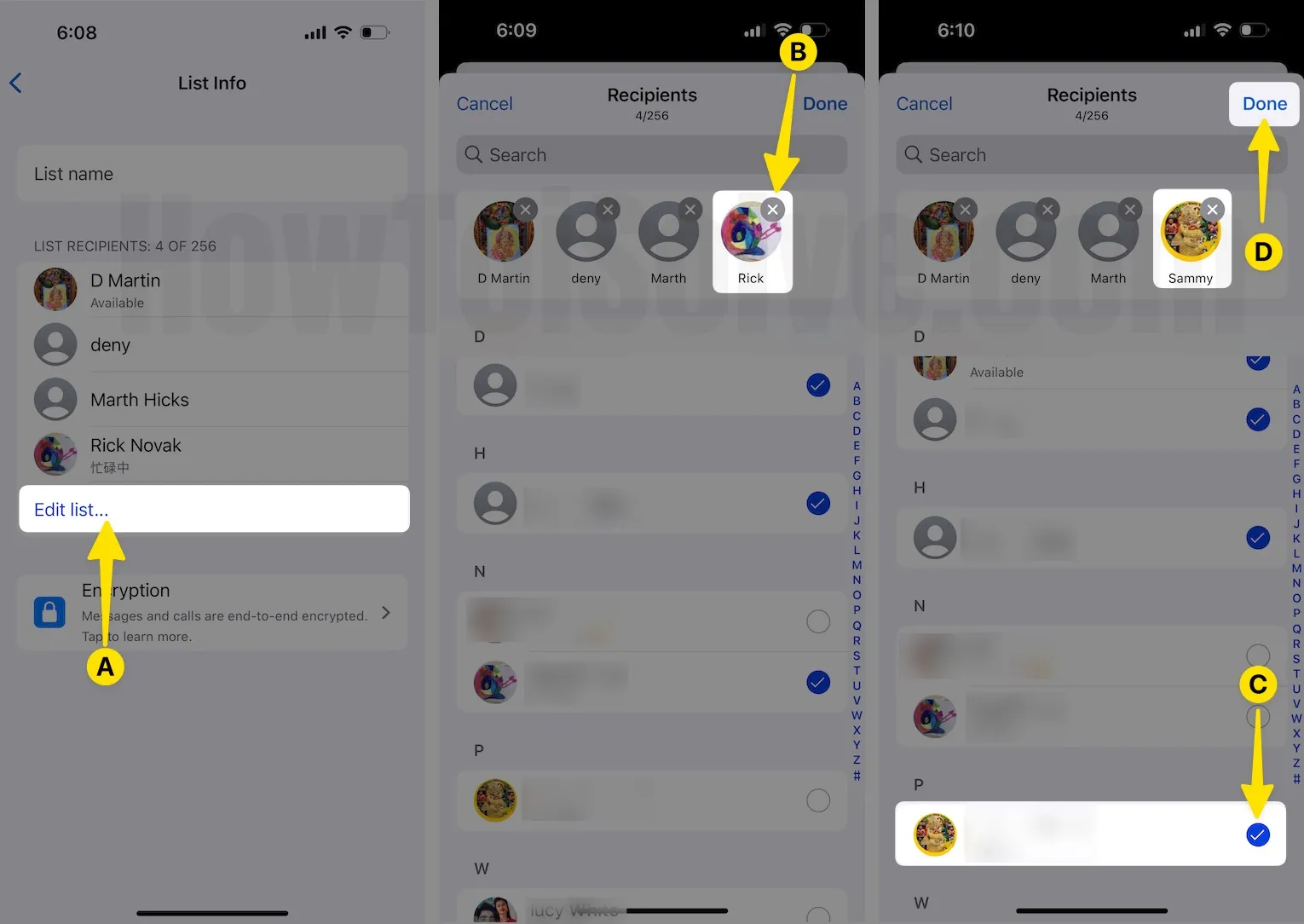
- Launch the WhatsApp App on your iPhone next, tap on Chat, then select Broadcast Lists. Now tap on Recipients, click on (I) on broadcast lists.

2. Select the Edit list… find a contact that you want to delete and tap on (X) beside a contact. Select a Radio button to add new contacts to the Existing Broadcast list.
3. Tap on Done.
That’s all right.
So above were the instructions to delete a contact from broadcast lists iPhone. But if you want to delete entire broadcast lists from the Whatsapp iPhone app, then you can do it easily. Take the help of the following steps.
That’s it.
Please share your thoughts on this story. Would you like the above way? Then subscribe our Google Plus and get daily new tips and tricks.