If you’re encountering the “An error occurred while downloading iOS 18 message on your iPhone, you’re not alone. Many users have reported similar issues on Reddit, often due to factors such as insufficient storage, unstable internet connections, or software glitches.
In this article, we’ll explore common causes of this error and provide step-by-step solutions to help you successfully update your device.
Why do you have to go for iOS update
After facing an error occurred while downloading the iOS error message,
Security Updates, Apple ID coverage, Message, FaceTime, Purchased Ringtones issue, Battery performance on iPhone, Photos, Instant Hotspot, Camera, Apple Pay Support for the Physical and Online store, and for App crash, and more bugs fixed.
Step to Resolve An Error Occurred While Downloading iOS on iPhone, iPad:
On our feedback for the suggestions on how to resolve An Error occurred while downloading iOS positive. If you also want to resolve this issue, try the following simple steps.
#1 If you are trying to update iOS using iTunes, first disable your antivirus protection temporarily, as it may block some ports required for data reception from the server. After completing the download process, you can enable it for later use.
#2 Keep a fully charged battery before the iOS update starts. Because the over Wi-Fi download and setup process will take time depending on your internet connection, as a prerequisite condition, your device will alert you.
1. Reset Network Settings
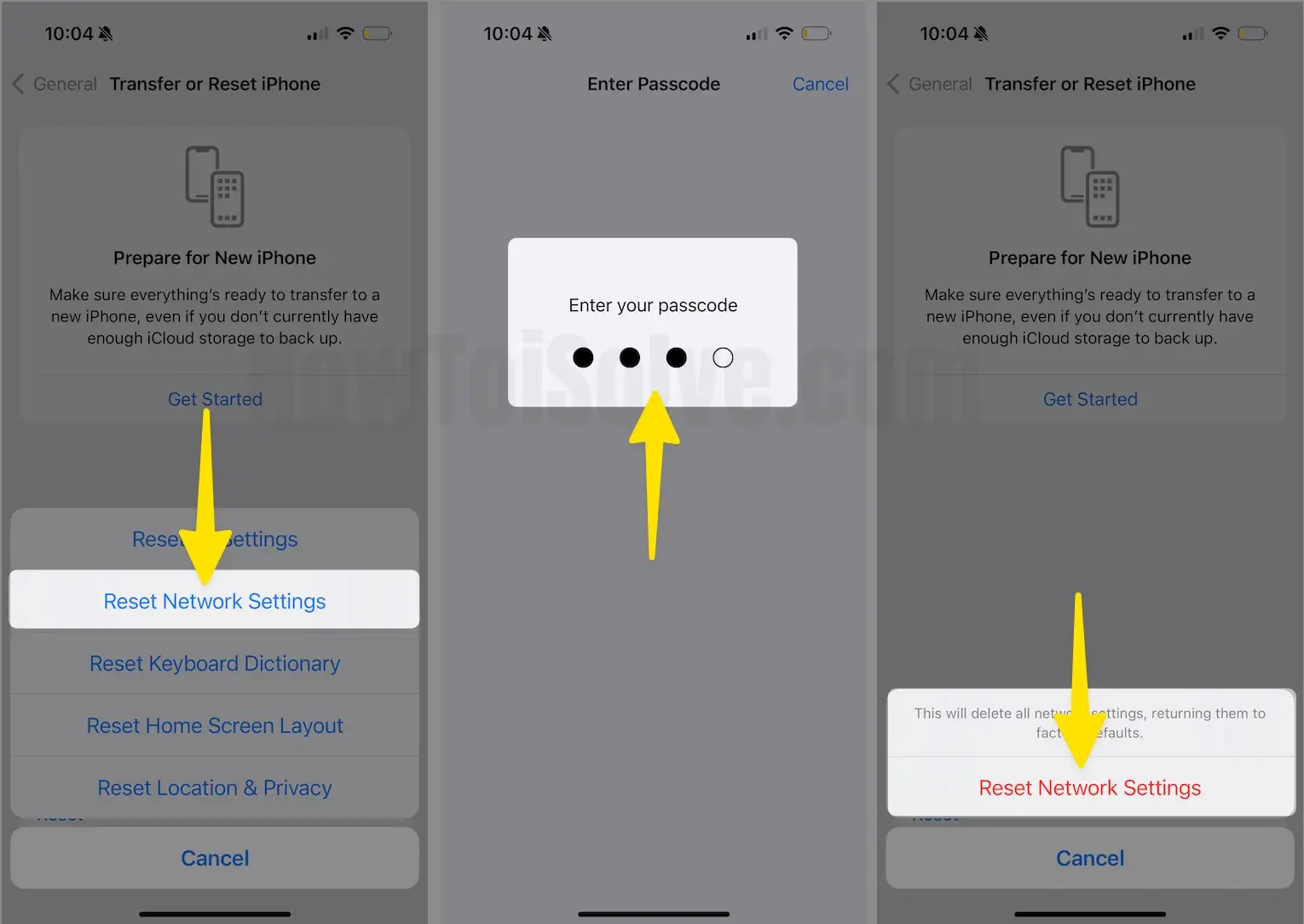
Some network interruption is occurring on your iOS device, Reset the Network settings: Go to Settings > General > Transfer or Reset iPhone > Reset > Reset Network Settings.
2. Try with Cellular or Mobile data plan
You have enough Cellular Data available for free to use while updating or downloading iOS. Turn it on on iPhone, go to the Settings > Cellular > Enable Cellular Data.
3. For Restart or Hard Reboot the Device
In most cases, the hard reboot is an instant fix for problems with downloading and installing a new iOS update. Let’s Do, Depending on the iPhone model, techniques to Hard Reset have changed, go with the below guide.
Press and Hold buttons until you see the Apple logo on Screen,
- Press and Quickly Release Volume Up button,
- Press and Quickly Release Volume Down Button,
- Press and Hold the Side Button until you see the Apple logo on Screen.
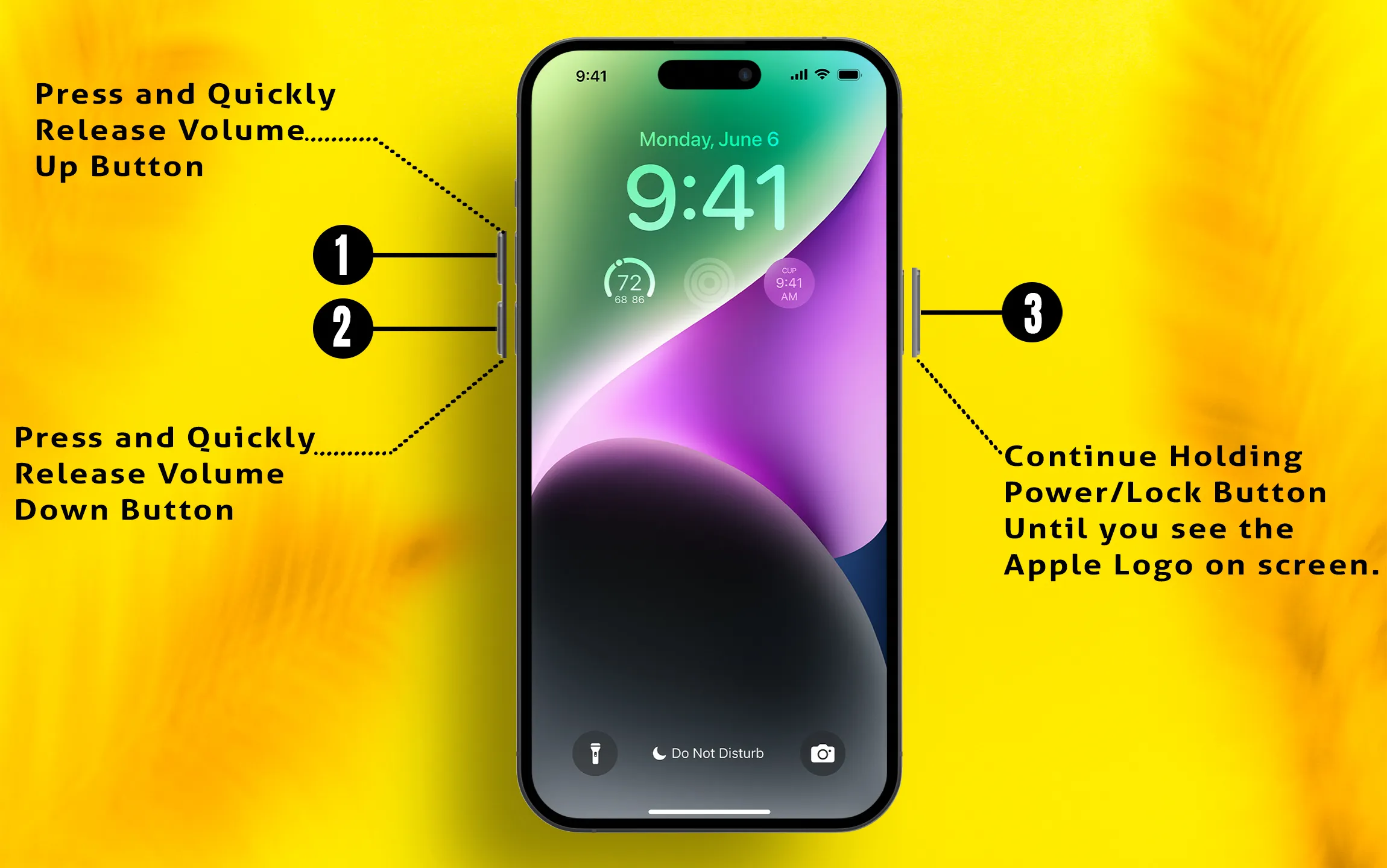
To Start the iPhone, Again press the Side button until the startup apple logo on the screen.
4. Remove Downloaded Old iOS File from iPhone Storage
Re-Download iOS File on your iPhone, and Try to install. Because outdated or corrupted iOS Update file causing the issue of this kind of error. also Removing old or large incompatible file create a problem of Storage space.
- Open the Settings app on iPhone > General > iPhone Storage > Here’s Manage Storage and Scroll to the screen then Find iOS File and Tap on it to Delete. Once you find it and deleted it, Try again to Download and Install the new iOS update on your iPhone.
5. Use Your Own Private WiFi
Public WiFi internet or Company WiFi doesn’t allow downloading and Update software on any device. For security reasons, Public WiFi providers block this type of connection. To Update Your iPhone, recommend trying on your Wi-Fi network only, either at home or at the Office.
- Switch to Your Confidential WiFi and Try to Update
6. Try Again & Again or Try Later
Apple Server is Busy! or Down! Most of the case people suffer this kind of issues for a specific region. so you can check the Apple Server status page online on your Browser, and Wait to fix the issues. Check out the below links for Apple Server status in your Region.
Some Related Apple Services is Down in your Country

Apple System Server Status after Resolved
- Here are some important links to check the Apple System Status in your Region,
- System Status in the US: [Some Services are Down in the United States, Please wait until fix]
- https://www.apple.com/support/systemstatus/
- System Status in Canada:
- https://www.apple.com/ca/support/systemstatus/
- System Status in France:
- https://www.apple.com/fr/support/systemstatus/
- System Status in the UK:
- https://www.apple.com/uk/support/systemstatus/
- System Status in India
- https://www.apple.com/in/support/systemstatus/
- use your country code after .com/ in the above link to check apple service status In your region.
7. Remove VPN if you are Using on Your iPhone
if VPN is enabled on your iPhone then Turn off the VPN or Delete VPN from your iPhone. For some security reasons, you can’t download an iOS Software update on your Device.
- Open Settings on iPhone > General > VPN > Turn off VPN.
8. Update using iTunes or Finder
Connect your iPhone to iTunes via lightning cable on Mac or PC. [macOS ]
Wait for Sync iPhone to iTunes, your iPhone will appear in the Device top tab, Tap on the iPhone icon and Get the iPhone detail in the large summary pane,
Another option is “Check for Update” Click on it.
Now, you can start the update process itself. First, iTunes will download the firmware file of your iOS device model and Start the installation process with no interruption like remove the device from Mac or PC.
Don’t miss: How to delete Credit card info and password from the iCloud keychain.
Still getting the same error “An error occurred while downloading iOS” on the way or another message when you gone for update iOS on your iPhone, iPad, and iPod touch wirelessly or through USB.