The McDonald’s Monopoly Game 2025 is officially back, and it’s bigger than ever! Starting October 6, 2025, customers across the United States can peel stickers from select menu items for a chance to win free food, cash prizes, cars, vacations, and even $1 million.
This year’s game is easier to join thanks to the McDonald’s app, which lets you scan and bank your property codes digitally while unlocking bonus plays for more chances to win. Whether you’re playing for a free Big Mac or aiming for the grand prize, here’s everything you need to know to register, play, and boost your odds of winning big at McDonald’s Monopoly 2025.
How to Register McDonald’s Monopoly in America

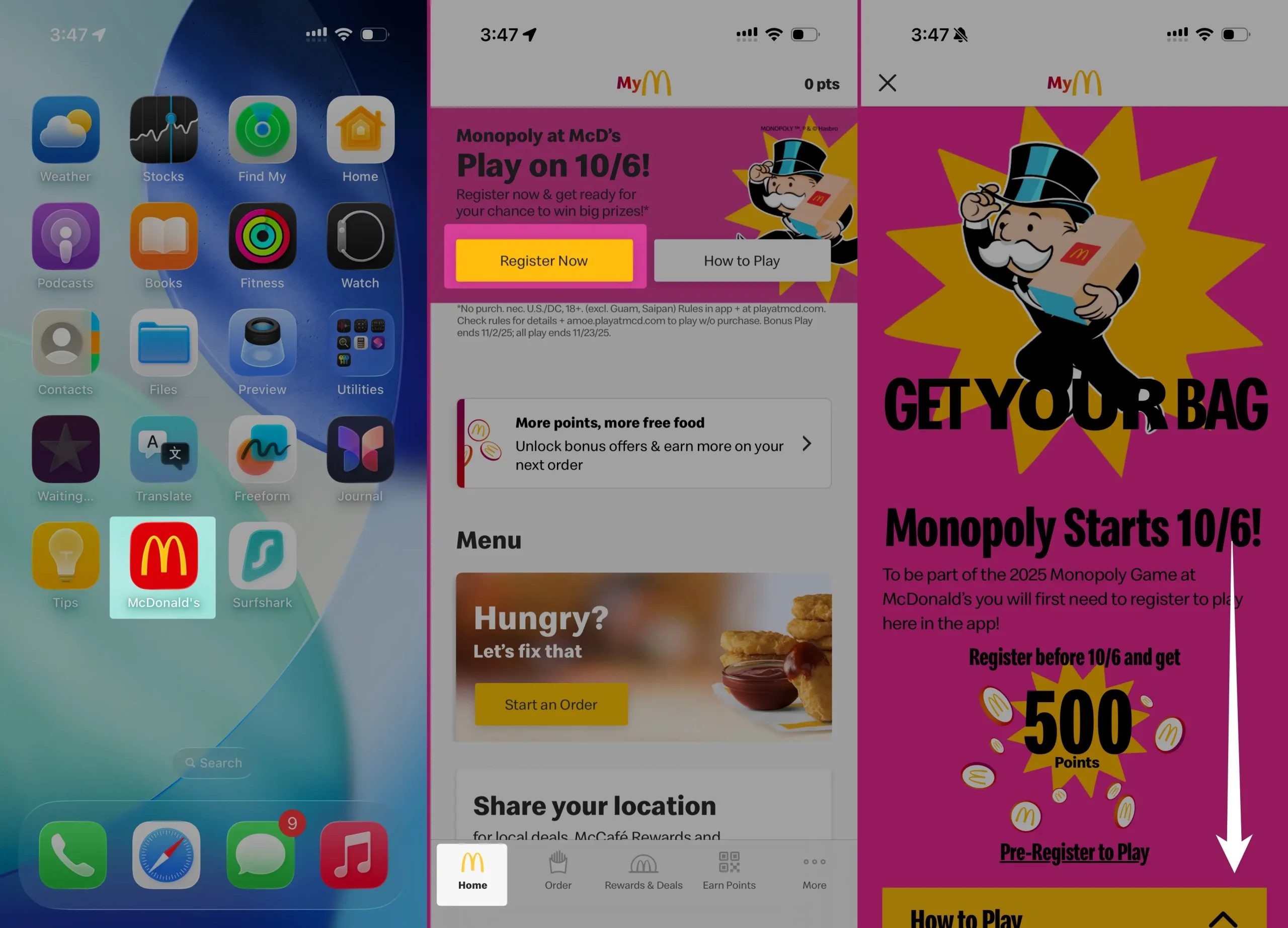
1. Get or Update the McDonald’s App & Sign In
- Download the McDonald’s app (iOS or Android) or make sure it’s up to date.
- Log in or create your MyMcDonald’s Rewards account. You’ll need this account to register and redeem game pieces.

2. Locate the Pre-Registration or Game Banner
- Prior to the official start date, McDonald’s will often display a “Register for Monopoly” banner or section in the app.
- Tap it, and it will guide you through the registration process.
- Sometimes, there is a pre-registration window (before gameplay begins) where registering early offers bonus rewards.
3. Accept Terms & Opt In
- You’ll be asked to agree to the Official Rules & Terms of the promotion.
- Also, you’ll need to make sure you’re opted in to MyMcDonald’s Rewards, since many game features and prize redemptions require you to be enrolled.
- Confirm your information (name, address, etc.) as required.

4. Get Registration Confirmation
- After registration, you may get a confirmation notification or message in the app.
- Occasionally, early registrants receive a bonus (for example, bonus Rewards points) just for registering.
- Once confirmed, you’re ready to collect game pieces when the game begins.
5. Collect Game Pieces During the Game Period
- Once the Monopoly game period starts, order qualifying McDonald’s menu items.
- Those items will include physical peel-off game pieces or digital game pieces (code entries in-app).
- For physical pieces, peel them off and scan them in the app to reveal whether they are an Instant Win or a Property piece.
- For digital pieces, “peel” or reveal in the app itself.
6. Redeem & Claim Prizes
- If you reveal an Instant Win piece (food prize, points, etc.), follow the instructions to redeem either through the app or in-store.
- If you get a Property piece, collect matching ones to complete sets. Once you complete a set, follow the app’s prompts to claim the larger prize.
- Some game pieces also give you a Bonus Play in the app — a secondary chance to win.
Important U.S. Monopoly Game Details (2025 Relaunch)
- In 2025, McDonald’s Monopoly returns to the U.S. for the first time in nearly 10 years.
- The game period runs from October 6 to November 2, 2025.
- Game pieces can be collected in-store or via app orders of eligible menu items.
- Pre-registration in the app usually opens before the official game start (e.g., Sept 29) with bonus incentives for early signups.
- You must be registered and opted into Rewards before collecting pieces to be eligible.
- Some prize redemptions (especially larger ones) may need to be claimed digitally via the app.
- Physical game pieces must be scanned in-app to confirm if they are winning or property pieces.
- Bonus Play rounds inside the app often run concurrently with or after the main collects.
Tips to Maximize Your Chances
- Register as early as possible to not miss additions or bonus offers.
- Keep your MyMcDonald’s Rewards account active and in good standing.
- Peel and scan physical pieces as soon as you get them — don’t let them sit.
- Complete property sets quickly — some rare pieces are harder to find.
- Use Bonus Play entries in the app daily.
- Read the Official Rules in the app — they’ll list eligibility, prize claim deadlines, and how to handle “no purchase necessary” rules.