Recovering or Restore Deleted files on a Mac computer or Macbook feature is really useful. Get how to roll back deleted files from the trash folder or save them back to your Mac’s drive from the trash folder. Users are facing many problems with the same type of restore process As files Available in the Trash folder want save back, Recover deleted files once deleted from trash on Mac, the Best third-party software for recovering files/ Folder from deleted trash.
The wrong habits always put you in trouble by (Completely Delete – “Command + Delete”) or Empty Recycle bin folder instantly. I recommended simply press the delete key to remove it from Mac.
In the solution there isn’t any official option for recover deleted files/ Folder from trash folder. You must go with third-party tools or recovery software.
Don’t miss: Hide photo on Mac Photo app
Steps for Recover or Put back deleted files on macOS Monterey/ EI Capitan, Yosemite
Save back from Trash
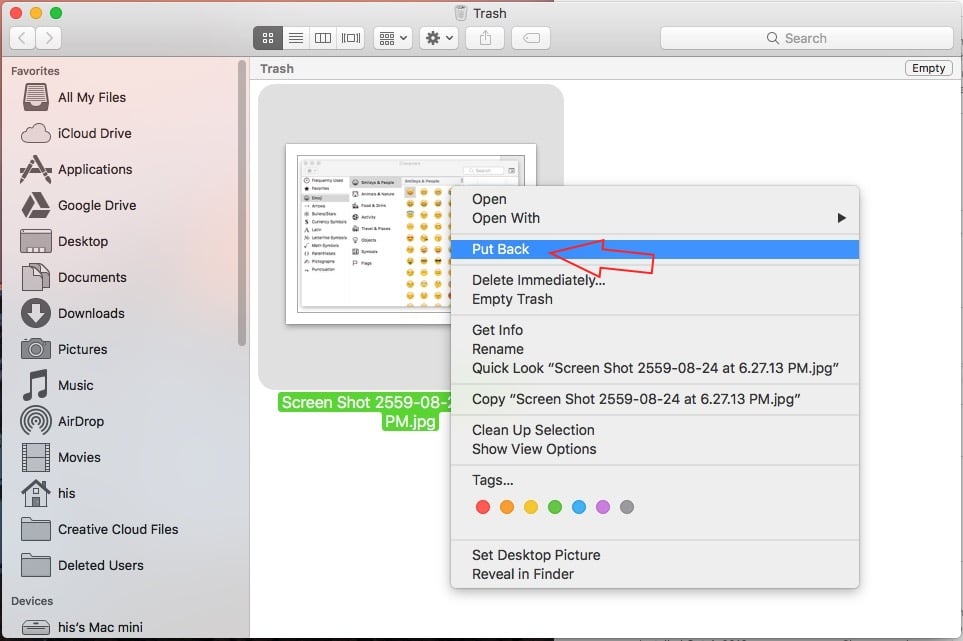
1: Open trash folder on Mac.
2: Select File/ Folder or Setup file, Right click on it then Choose “Put Back”. See Image below.
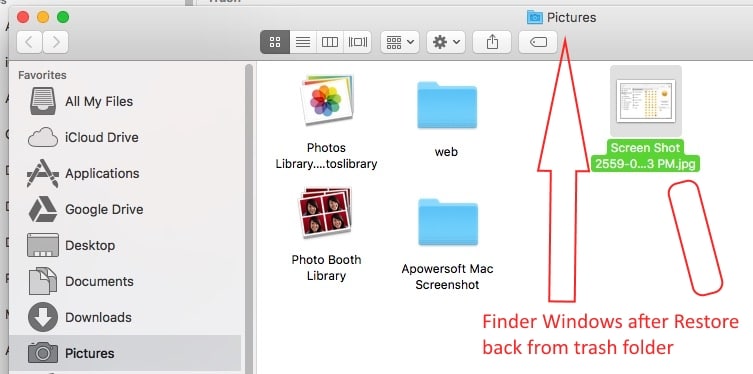
At a time you will find another finder window on trash folder, which shows where your Data saved back on Mac.It’s easy to identify and use it directly from default primary location.
Stop auto empty Trash folder from Settings
Auto empty Trash is disappointing mostly all users by auto clear file saved more then 30 days.

Make your job more easy with this option, you want some data temporary in Trash folder and want back in future for reuse. Also check “Remove items from the Trash after 30 days” in finder preference.

Auto Backup or Regular Backup schedule
Just like Restore point on windows system, Mac users can use Time machine for backup.
As a third party solution we can try Super Duper ($27.95) or Carbon copy Cloner ($40).
Also stellar Mac data recovery is great and Fastest, Optimized tools for lost data on Mac.
Share how this article helpful on Deleted files on macOS Monterey/Sierra, EI Capitan, or Yosemite. Based on the Recovery solution you can share your ways in the comment box.