In Short
- Learn how to filter your Facebook activity log by date and categories on your Facebook mobile app. Go to Facebook account settings on iPhone > Activity log > Logged Information > Filter > Date > View & Trash.
- View and delete my Facebook account’s activity log.
The Facebook Activity log is a very useful security feature for all Facebook users. So any time the user can see past activities like comments, Liked photos/Videos, posts by you, and more. And manage it from the Activity log setting. Facebook designed activity logs on a month or day basis, so the user can easily identify when you’re done this activity on which day by you or others (Your colleagues, Parents, or child).
You can delete an old activity log from FaceBook, in some cases if you like some unwanted photos/ Videos Accidentally, Send a friend request to an unknown person that you can find from the activity log easily and remove it from there as well. Now I explain to you how to find the Activity log on the FaceBook app and delete the old activity log from the FaceBook iPhone and iPad.
How do I delete all Activity Logs on the Facebook App and PC Computer?
No, there isn’t a single button on the Facebook mobile app or even on the web PC computers. You can clear Facebook activity by following the below steps. [scroll the screen and get complete information]. more, you can delete your Facebook account if you don’t want to use it in the future.
How do I clear my activity log on Facebook on the mobile app iPhone?
1. Open the Facebook App on your iPhone or iPad. [sing-in by entering your User ID and password, if signed-in go to the next step]
2. Now Click on Three Horizontal Lines called the More tab at top left corner.
3. Click on Settings (gear icon).

4. Select Settings. Now scroll down and Tap Activity Log (View and manage your information and some settings.) appears under the Your FaceBook Information section.

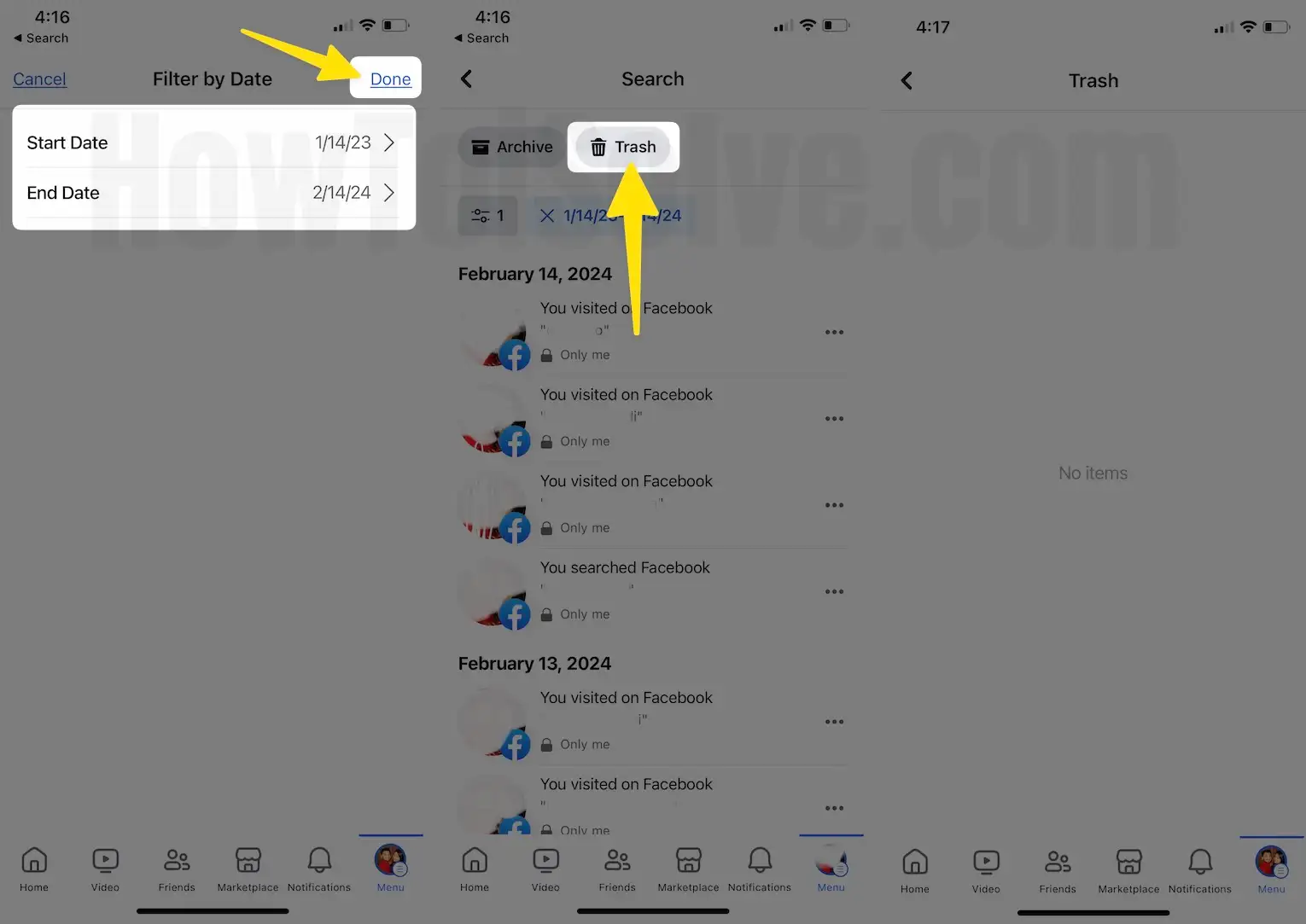
5. Scroll the screen and Tap on Logged information. Scroll & Find the Search > Manage Search. Tap on Filter > Select Date.

6. Select Start Date & End Date and choose the date for the Done Button.

7. Next, Tap on the Done to see the result. Click Trash. The logs of the activities for the date range you’ve selected have been deleted.
As you can see Year and Category buttons are on the top of the page.
- Year tab– if you click on the year tab- you can see Year by Year List. Choose a year to get an activity log of the specific year and month-wise.
- Posts
- Posts You’re tagged in
- Photos and Videos
- Photos You’re Tagged In
- Other’s Posts To Your Timeline
- Hidden From Timeline
- Likes and Reactions
- Posts and Comments
- Comments
- Profiles
- Added Friends
- Removed Freinds
- Send Freinds requests
- Received Friends Requests
- Life Events
- Archived Stories
- Your Stories
- interactive Videos
- Songs You’ve Listened To
- Articles You’ve Read
- movies and TV
- Games
- Books
- Products You Wanted
- Videos You’ve Watched
- Voice interactions
- Following
- Followers
- Groups
- membership Activity
- posts and Comments
- Your Events
- Event Responses
- Polls
- Search History
- Videos You’ve Search For
- Groups you’ve Searched For
- Location History
- Saved
- your Places
- Active Sessions
- logins and Logouts
- Recognized Devices
- Apps
- Relationships
- Pokes
- Hobbies you’ve Added to your Profile
- Stories Activity
- Volunteering
- Challenges
[Note: this is the example of the post-category Activity log,
if you will go with other categories apart from the Post activity log then maybe not get options as shown in my given picture.]
That’s it!
How to Delete old Activity log from the Facebook timeline on Pc Computer
Note: For the Desktop, You have to follow the same process within your Facebook settings option.
It is really helpful to Delete old activity logs from FaceBook, If you want more tips and troubleshooting guides on Facebook tips, kindly share them with us, and we will be glad to assist you.