Do you want to learn how to email someone whatsapp chat to any WhatsApp contact? Well, This article will guide you through different methods that you can use to share your emails on whatsapp. Although WhatsApp is a popular social media app used for communication, sharing content, and promoting businesses, there is currently no built-in feature to share chats like you can share pictures or documents. Follow this guide to learn how to forward emails to any whatsapp chats.
Android phones are pretty more flexible than iPhone, you can convert Mail to PDF, drag and drop mail images on WhatsApp Web, or copy/paste the Mail Body into WhatsApp Chat. Here’s how to send Gmail emails to WhatsApp.
How to Send Received Emails to WhatsApp in 3 Ways
Method #1: Email WhatsApp Chats Using Print Option
By this option, you can save the Email as a PDF on the device and then share it as a document in WhatsApp. That PDF will automatically save on the local storage until you delete it manually. This method could clutter your phone if you keep holding the Emails as PDF on the phone.
Forward Email on WhatsApp on Phone – iPhone, Android Mobile
How to send PDFs from Gmail to WhatsApp or how to send documents from Gmail to whatsapp
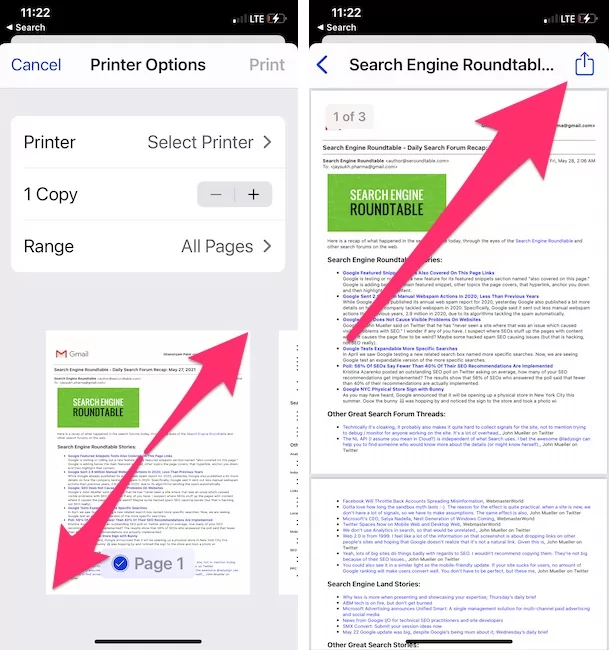
- Open the Gmail App in iOS.
- Open the Email.
- Tap on three dots in the top-right corner. [for the Apple Mail app [✉️] on an iOS device,
- Tap on the Forward icon
- Scroll to the Print option in the Share sheet popup.]
- Select Print
- AirPrint.

- Pinch Zoom the Email page to convert into PDF format.
- Tap on the Share button to the Save or Share in PDF.

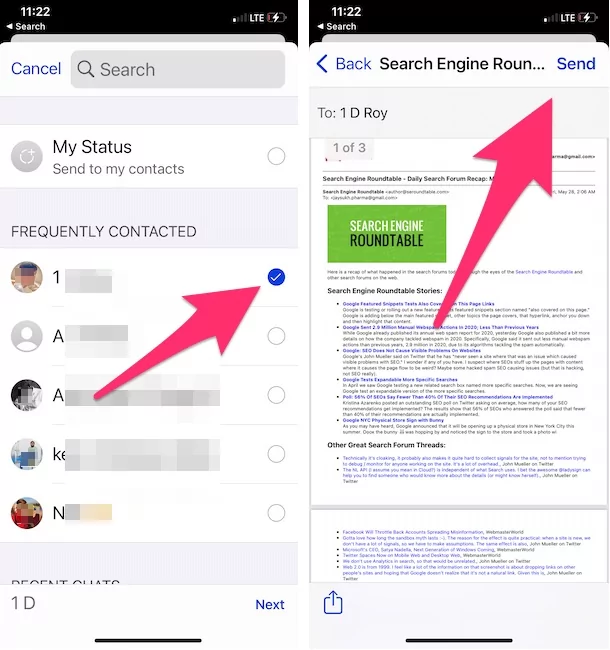
- Select WhatsApp from Share sheet
- Select WhatsApp Conversation or People [Also you can save PDF file to Files app, From Option of Given in Share sheet, Slide down and Select Save to Files].
- Send the Email PDF in WhatsApp Directly, Just like Forward email to WhatsApp and Send it.
- Or, Choose the location where you want to save the email.
- Now open WhatsApp.
- Tap on the WhatsApp contact.
- Tap on the Share icon.
- Select Document and navigate to the location where you have saved the Email as a PDF. Your WhatsApp is only able to browse the Files app [Built-in Apple’s File manager app].
- Locate and send to WhatsApp Contact.


How to send email to WhatsApp from Outlook
- Open Outlook Mail message in Outlook app
- Next, tap on More (…) Option appear at the top-right corner
- Choose Print Conversation from the list
- Tap Print
- Click again on Print, a share sheet will show you various apps
- Choose WhatsApp, now find a contact you would like to send.
- Tap on contact
- In last, click on send.
That’s it.
Here your opponent side users will get as a PDF document in its WhatsApp chat. They can easily access to read, in addition, it is easy to print and can download to save on local storage.
Using the same way, you can send Yahoo email to WhatsApp, but if you want to send a whatsapp message from pc without adding a contact, then it’s not possible right now.
Forward Email on WhatsApp On Desktop – Mac or PC 💻 <–>🖥
- Launch Gmail App in iOS.
- Open the Email.
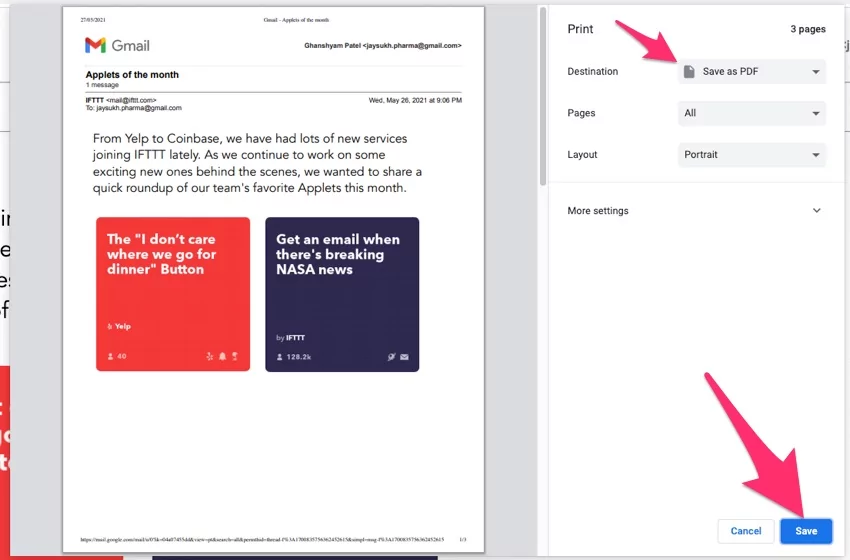
- Click on the Print icon to Print out the Email body and Save it to PDF format, With Email Messages Title, Body, Date & Time, From Address and To Address.

- Select Save as PDF in the destination dropdown menu option.

- Click on the Save button to Save PDF email format on your Mac or PC drive.
- Now, Open Web WhatsApp Version to send Email PDF files directly in WhatsApp Chat conversation.
- Just Drage & Drop to Chat and send it.

- or
- Click on the Pin attachment icon and Select the Document type. Browse the PDF file and upload it in conversation to send it.

- Just Drage & Drop to Chat and send it.
- That’s an easy method to forwarding or Send a copy of an email in WhatsApp when you are on Desktop.
- Now, Open Web WhatsApp Version to send Email PDF files directly in WhatsApp Chat conversation.

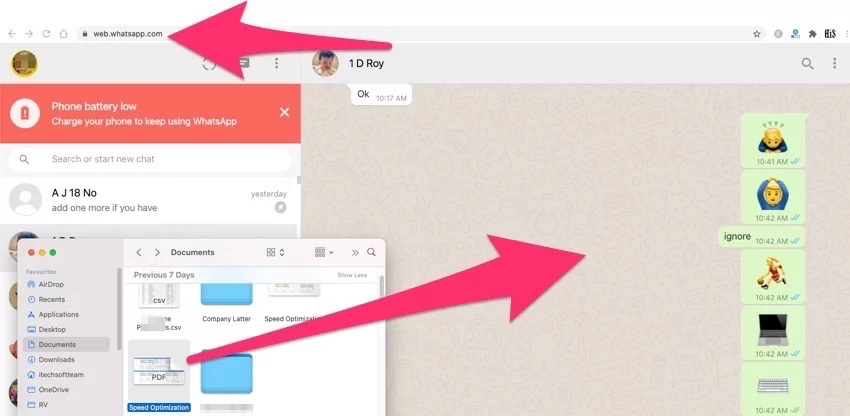
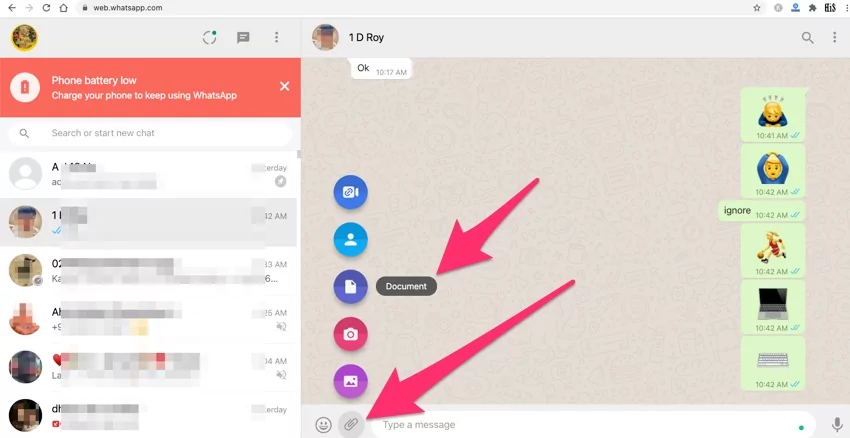
Or
If you are on Mac, and You have an iPhone, then Share PDF file to iPhone via AirDrop quickly and Save it in iPhone’s files app to send it in WhatsApp.
Another method is to Send your Email to WhatsApp.
Method 2: Copy/Paste Mail or Screenshot
This is the easiest and quickest way to send mail to WhatsApp. Just like we copy any message and paste it, this can be done in the same way.
- Open the Gmail App on your phone.
- Go to the Mail that you want to share over WhatsApp.
- Touch and hold the text body on the mail until a small strip appears; there, tap on Select All and tap on Share.
- From the Sharing Panel, select WhatsApp and once the WhatsApp opens, select the WhatsApp contact you wish to share.
Or
Take a Screenshot of an Email and send it in whatsApp conversation, By sending an Email picture, the receiver will not see the text and is easy to read and might be blurry pictures. so I recommend sending it in PDF Format. Explained earlier.
Method 3: Share Image by Drag and Drop on Mac or PC
Sharing Emails from Gmail or any Email Client to WhatsApp can also be achieved with the help of WhatsApp Web. Open the Web WhatsApp on any browser Using iPhone, and in the other tab, open the Mail with Image.
First, open the Chat in the WhatsApp Web, drag the Image from the mail, take it to WhatsApp Web, and drop it.
![How to Email WhatsApp Chats on iPhone, Mac, PC [2026 Updated]](https://www.howtoisolve.com/wp-content/uploads/thumbs_dir/install-tiktok-on-mac-p7rx98qrbpd0x9f34x3paedplnae6ybbs7hxolbk8s.webp)
![How to Email WhatsApp Chats on iPhone, Mac, PC [2026 Updated]](https://www.howtoisolve.com/wp-content/uploads/thumbs_dir/apps-wont-update-on-mac-or-macbook-p7vccsm4ijtltwcbzhczr4251gqe2x9oecqwm6m4vw.webp)