
User Posts: Jaysukh patel
0
Key Takeaway: Turning off the predictive text feature on your Mac can be easily done through System Settings. If you find the predictive text feature to be ...
 Jaysukh patel
0

The Apple Vision Pro headset features built-in audio pods positioned close to the earlobe on either side, offering augmented reality with Spatial Audio ...
0
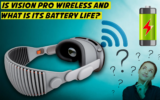
The Apple Vision Pro headset is essentially wireless, but requires an external battery pack that lasts up to 2 hours. It functions independently, eliminating ...
0
Key Takeaway: Dictation is a valuable feature on Mac, now improved with enhanced capabilities in macOS Sonoma, allowing hand-free access and multitasking. To ...
0
With iOS 17, Apple has released an incredible number of features that will improve your iPhone experience. There are plenty of new features to appreciate, ...
0
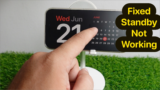
Key Takeaway: Troubleshooting iPhone standby mode issues can be resolved by checking device compatibility, ensuring proper positioning on an upright charger, ...
0

Key Takeaway: This article offers various solutions to fix screensaver issues on Mac, including changing the screensaver, disconnecting external peripherals, ...
0

You might have invested your hard-earned money in buying your favorite iPhone 14 Pro Max, 14 Pro device. Besides all of the mentioned features, forget not to ...
0
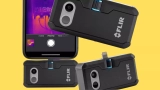
FLIR means Forward-Looking Infrared. This technology, which is commonly used in thermal imaging cameras, allows users to generate an infrared image of a scene ...
0

If you are using a Macbook, You must be familiar with Apple mail. For those who are not, apple mail is the in-built mail service provided by Apple on your Mac ...
User Articles: Jaysukh patel
Sorry. Author have no articles yet
Browsing All Comments By: Jaysukh patel

Yes, I mean you should go with the method 1, Cancel Apple Music Plan from iPhone.
Thanks it will work for you!
In Latest iOS 12, There is no any option that you are looking for! pls, share screen if you have!
yes, Brittnay caught right point. For use Personal hotspot you must have active cellular plan and your carrier companies allow to use personal hotspot in a purchased or active plan.
Sorry to hear that. In present iOS 12, it’s not possible. Wait for Future update. in addition, you can send feedback to apple.
Thank you for Sharing!
You can export all the contacts manually from first Apple ID and restore into another Apple ID login.
Get tips over here, (Read the first part)
https://www.howtoisolve.com/how-to-save-iphone-xs-max-iphone-xs-or-iphone-xr-contacts-to-gmail-transfer-without-software/
Thank You For your Feedback! Care your Apple Watch. Because After Reset/Unpair & Repair, Find my Watch will auto disabled.
Right now it’s bug in iOS 12.1
Now, We Updated this Article for iOS 12.1
Happy Visiting us!
iOS 12 or later iOS: Restrictions settings are moved inside Screen Time,
Check this tutorial, https://www.howtoisolve.com/enable-use-restrictions-on-iphone-ipad/
Might be Deleted. You can get back after clean install that i explained in the Last solution. Restore your iPhone to Factory settings then restore Backup.
1. First Back up your iOS device on iTunes.
2. Update or Restore iPhone using iTunes in recovery mode to re-install new iOS 12.
3. Use iTunes to Setup new iPhone that auto copy all the data back as of earlier.
Thanks
Sorry, Apple Dropped This feature in Edge to Edge display mobile. Wait for the next update..
Beta profile installed on your iPhone X, first check this.
Go to the Settings > General > Profile.
Otherwise, Re-install iOS 12 beta profile then Force Restart iPhone X. I am sure this will work for you!
Thanks.
if you are irritating with Slow speed issues and Bug. Don’t do that try to install manually.
Restore will copy all the data (Files and Folders) as like earlier.
I am using Clean installed macOS Mojave. Very happy to use my mac.
Right not Available, until wait and enjoy default settings…
Yes, iOS 12 Required on Both Devices. and it works for all.
Don’t afraid.
You can Force Restart, https://www.howtoisolve.com/how-to-restart-reset-iphone-ipad-or-ipod-touch-ios-8-ios-7/
Or Use iTunes to install Public Version iOS 11.4 (https://www.howtoisolve.com/download-install-ios-itunes-iphone-ipad/) and Once you setup iOS 11.4, Re-try to install iOS 12 beta 4 public version on your iPhone.
Thanks.
have you taken any action?
but it is automatic functionality that put your iPhone at 30 seconds lock while you turn on LPM.
you can do anything while a phone is on charging. First charge it, Remove LPB and Now you can change Auto lock screen time, Settings > Display & Brightness > Auto-Lock (set 30 seconds to 5 Minutes or never).
Update WhatsApp. then Reset all settings and try again.
Hope this Help!
it will come to soon. Just Wait, but it’s confirmed.
double check your script, don’t copy from the webpage. try correct text that used here with an Example.
if possible share your screen via Email or Describe more, current MacOS Version, Mac Model and more..
Thank u! i glad to help you!
Thanks for your Voice! Enjoy
Check your Country! Can you share from which country you belong?
Follow my Guide Install News App outside USA, UK: Follow Clue 0 at top in article.
OTA means > Over The Air or Using WiFi.
You don’t need iTunes or Mac/PC.
you need to wait for few seconds, Mac App store will open on your screen with MacOS Mojave download option.
Also note that Your Mac doesn’t turn off or stop to go into sleep mode otherwise you need to re-download MacOS (6GB Setup file).
Thank you! i Check out your problem at my end and it’s works for me!
Yes, country wise it might be different with the name. But you can go with the same steps.