Generally, People close or delete their Skype accounts for specific reasons like not being able to retrieve login credentials, not being able to change profile details, having Information stolen by someone, or being frustrated with Skype. Otherwise, Skype is the best platform for online chat, Personal/ Group or conference audio/ Video calls and chat. Throughout the entire process, please verify the payment details submitted initially. Connect to your Microsoft account.
Using this way, we can permanently delete Skype account, after that nothing to do. Just like Delete Snapchat account.
Note: Skype app does not have the option to delete or Close account from settings. So you must go with Mac Browser or iOS browser.
Next, I will see how to block/ Remove Skype contacts or iPad. That’s helping tutorial for all.
Steps to delete a Skype account using iPhone, iPad, or Mac
On iPhone/iPad
To Delete Skype Account on iPhone, iPad
- Open the Skype app for iPhone or iPad.
- Go to Chat Screen > Tap on Your Profile in top center.

- Scroll Down and Find Account and Profile > Settings > Account & Profile.
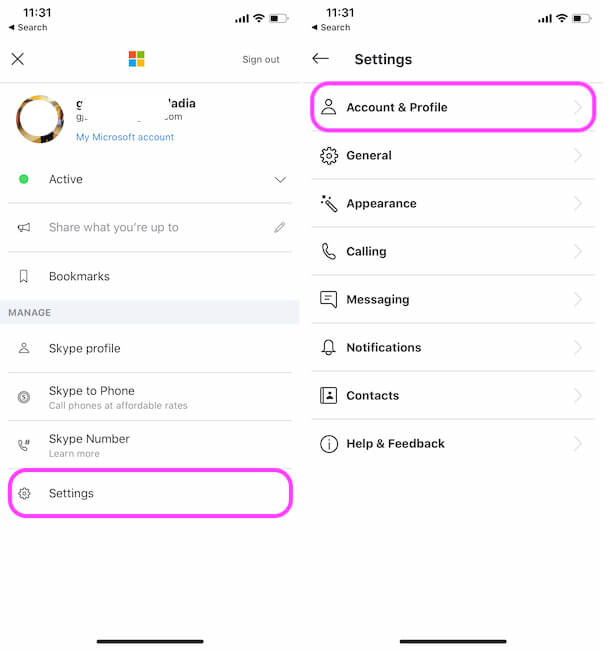
(For Sign out: Scroll down to the bottom of profile page > Sign Out)> Close your account.

You will be redirected to the Microsoft login screen, Sign in with your Skype account.
Verify yourself and Done.
How to Delete Skype Account On Mac
Apple Mac operating system is quite different than Microsoft Windows, and so its App user interface also changes. Similarly, Skype also looking to differ on Mac. Let’s learn here how to delete a skype account on your Apple macOS Catalina or earlier running on MacBook Pro, MacBook Air or iMac & MacMini.
Step 1: Go the Skype account (skype.com) page in the browser, Login to Your Skype Username and Password. Also, we can search Old Skype address on this page and go for Delete Old Skype account permanently.

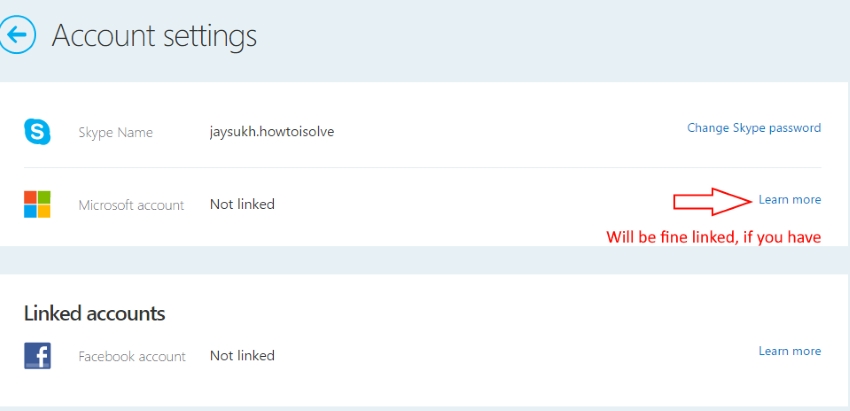
Step 2: On the Account settings page, scroll down the page and find the Settings and Preferences section, then go to Account settings.

There you can see the linked Microsoft account if you are connected already. First, unlink it, that might be typical if your account is connected to two Microsoft accounts. (On unlink request you will lose all synced contacts on your Skype account)
Step 3: When submitting your cancellation request, please stop recurring payments in your billing or subscription.
Step 4: Next, click on Cancel Subscription to proceed. Then click on “Thanks, but no thanks, I still want to cancel”.

For more assistance with canceling your Skype account, refer to the official source below.
- Request to Skype to get Refund
- Contact Skype Support
- Online Cancellation and Refund
Cancel Close Skype account request
After your final closing request to Skype, you have enough time (30 days) to roll back yourself and reappear on Skype.
Within 30 days you can get all data from Skype-like contacts, Chat history and purchase history.
Are you logged in Skype on other devices?
With just a single command, we can remotely log out of a Skype account on all devices (iPhone, iPad, Mac). Just send /remotelogout text chat message to anyone in your Contacts list.
Related useful tips:
Need more help to close or delete your Skype account, we are happy to help you!